The highly anticipated Super Smooth graphics options have finally been added to Battlegrounds Mobile India (BGMI). The developers rolled out the BGMI 4.0 update on September 11, 2025, but gamers didn’t receive the new graphics setting at that time. However, as of September 13, the option has now been added to the game. The new graphic setting provides lag-free gameplay.
Super Smooth graphics option now available in BGMI 4.0 update
Krafton India released the BGMI 4.0 update on 11 September 2025, bringing an exciting Spooky Soiree theme mode along with many new features and gameplay enhancements. Now, after the two days, the highly anticipated new “Super Smooth Graphics” setting has been added to the game. This new BGMI graphics setting provides a smoother and lag-free gameplay experience.
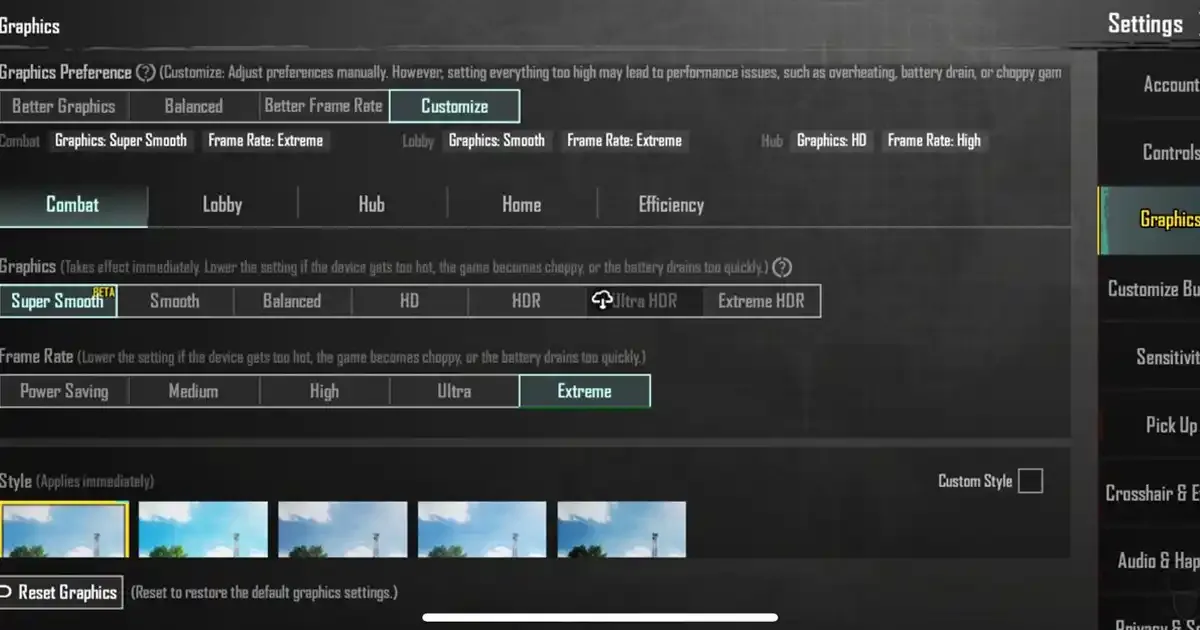
Now, the game has seven graphics settings: Super Smooth, Smooth, Balanced, HD, HDR, Ultra HDR, and Extreme HDR.
Playing the game with the Super Smooth setting, the graphics will become light, and games can get good and reach FPS. This might also help with the fluctuation issue that low- and mid-range device players faced while gaming. The main focus of this Super Smooth graphics setting will be on the performance and not on the visuals.
How to apply Super Smooth graphics setting in BGMI?
Step 1: Open Battlegrounds Mobile India (BGMI).
Step 2: Go to the "Settings."
Step 3: Click on "Graphics."
Step 4: Now choose the "Super Smooth" option.
Step 5: Click on "Apply."
Step 6: Now relaunch the game and enjoy BGMI in super smooth graphics.
The BGMI 4.0 update is one of the most exciting updates for gamers. The much-awaited BGMI Super Smooth graphics finally arrived in the game. The new Spooky Soiree theme mode was also added, along with new features, themed items, areas, vehicles, powers, and more.